
Oracle Cloud Port Forward
Intro
I highly recommend using Oracle Cloud’s free tier for anyone wishing to play around in Cloud Computing or even wishing to host a few free servers or services. In order to host a server or service though you most likely will need be required to port forward. This guide will assume that you have created an account and set up a virtual machine (VM) and virtual cloud network (VCN) properly.
To port forward within OCI you need to add an exception within the iptables of the VM and the VCN associated with the VM.
IP Tables
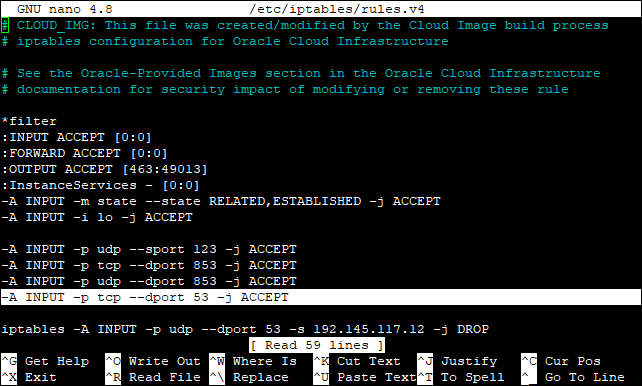
In an OCI ubuntu instance there are two iptables, an IPv4 and an IPv6 table. To add an exception for a VM on the iptables use one of the following commands to first be able to edit the appropriate table using Nano.
sudo nano /etc/iptables/rules.v4
or
sudo nano /etc/iptables/rules.v6
Once you are in the appropriate rule list simply modify the statement below appropriately (for IPv4) and insert it in the rules.
-A INPUT -p tcp –dport 53 -j ACCEPT
After doing so save the changes and there reboot the system using either the web dashboard or issues a “sudo reboot” command.
N.B. If you open a port on the VCN that will open that port for all VM’s within that VCN if those computers also have a rule which opens the port on the VM’s iptables.
Also ensure that you have a program listening on the port desired to be port forwarded else the port will not appear as being open.
Virtual Cloud Network (VCN)
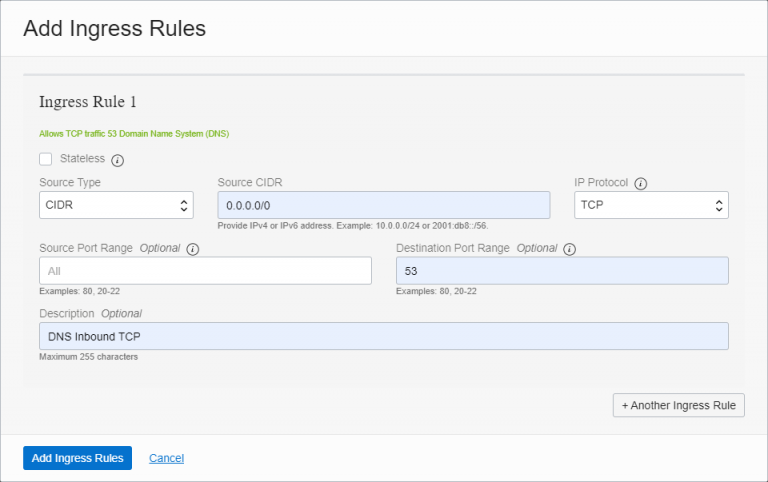
The second set to port forwarding in Oracle Cloud is adding an exception rule in the VCN associated with the VM. To do so simply navigate to the Default Security List for the VCN and click on the “Add Ingress Rule” button. You can use the picture below as a guide as to how to configure your rule. The rule in the example will open the port 53 which we previously added to the VM iptable as described above.
N.B. If you open a port on the VCN that will open that port for all VM’s within that VCN if those computers also have a rule which opens the port on the VM’s iptables.
Also ensure that you have a program listening on the port desired to be port forwarded else the port will not appear as being open.
Oracle Cloud Port Forward
Intro
I highly recommend using Oracle Cloud’s free tier for anyone wishing to play around in Cloud Computing or even wishing to host a few free servers or services. In order to host a server or service though you most likely will need be required to port forward. This guide will assume that you have created an account and set up a virtual machine (VM) and virtual cloud network (VCN) properly.
To port forward within OCI you need to add an exception within the iptables of the VM and the VCN associated with the VM.
IP Tables
In an OCI ubuntu instance there are two iptables, an IPv4 and an IPv6 table. To add an exception for a VM on the iptables use one of the following commands to first be able to edit the appropriate table using Nano.
sudo nano /etc/iptables/rules.v4
or
sudo nano /etc/iptables/rules.v6
Once you are in the appropriate rule list simply modify the statement below appropriately (for IPv4) and insert it in the rules.
-A INPUT -p tcp –dport 53 -j ACCEPT
After doing so save the changes and there reboot the system using either the web dashboard or issues a “sudo reboot” command.
N.B. If you open a port on the VCN that will open that port for all VM’s within that VCN if those computers also have a rule which opens the port on the VM’s iptables.
Also ensure that you have a program listening on the port desired to be port forwarded else the port will not appear as being open.
Virtual Cloud Network (VCN)
The second set to port forwarding in Oracle Cloud is adding an exception rule in the VCN associated with the VM. To do so simply navigate to the Default Security List for the VCN and click on the “Add Ingress Rule” button. You can use the picture below as a guide as to how to configure your rule. The rule in the example will open the port 53 which we previously added to the VM iptable as described above.
N.B. If you open a port on the VCN that will open that port for all VM’s within that VCN if those computers also have a rule which opens the port on the VM’s iptables.
Also ensure that you have a program listening on the port desired to be port forwarded else the port will not appear as being open.